
The thing you could have known
Most of my small travel failures were not surprises. A garden that sells tickets only online, a museum that is closed on Mondays, a temple whose side hall needs a reservation the day before. The information existed; it just was not where I was looking when I needed it. In 1.5.8 TravelOrbit learned to keep a long plan moving. 1.5.9 is about the places in it.
What a place note says
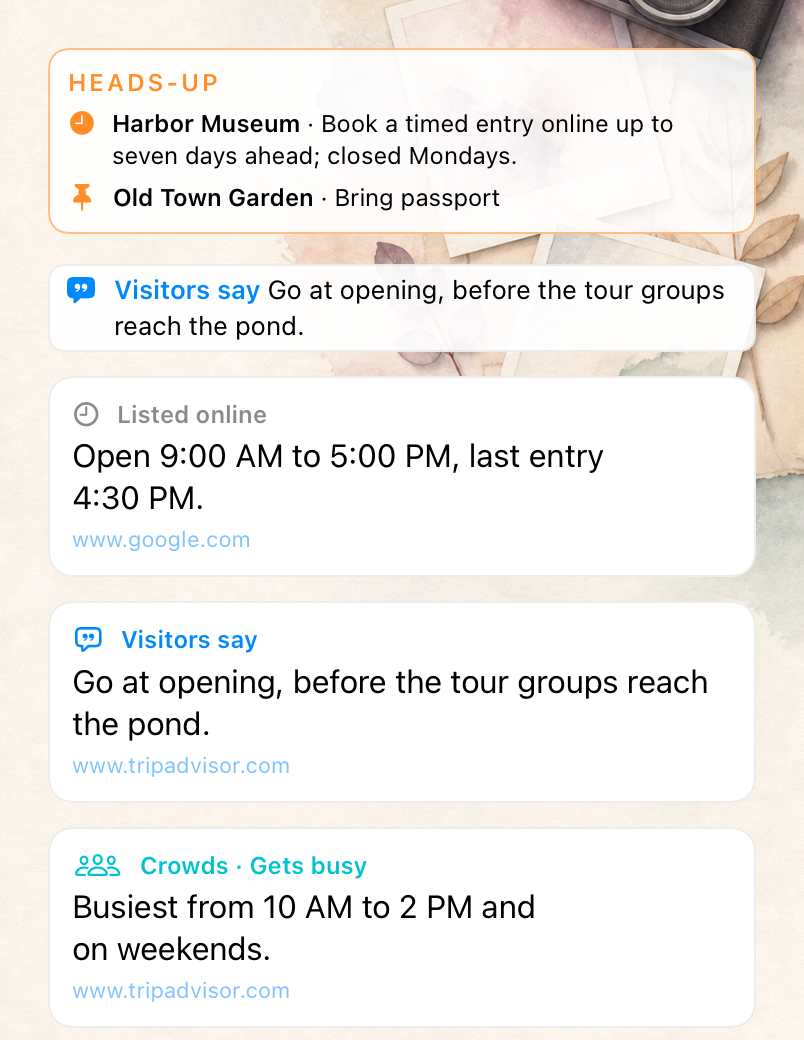
With TravelOrbit Plus, each activity and stay can carry up to three short notes: its hours, a tip for that kind of place, and how busy it gets. The tip follows the kind of place. A museum gets what is on now and whether to book; a restaurant gets what diners recommend and whether to reserve; a show gets when to arrive; an appointment gets the practical steps, like what to bring and how to register, and no sightseeing advice at all.
Every note says where it came from. “Visitors say” is something people who went wrote; “Listed online” is hours from a listing, not the venue speaking; a reported closure is marked as news. The notes are looked up for places up to a month ahead, and the source is linked under each one. Crowd levels are what visitors report, not a live count, and the note says so by leaving the level out when the sources do not state one.
A note stays on the card until it expires or a newer note of the same kind replaces it, so closing the app or losing signal does not clear what you already had.
The morning heads-up
The day’s plan now opens with a heads-up when there is something you should not miss: a reported closure, or a tip that costs you the visit if you ignore it, such as booking a timed entry, bringing ID, or a last entry time. Ordinary tips, like the best dish or the nicest view, stay on the card. Each item leaves the heads-up once that plan has started, and the strip goes away when nothing is left.
You can put your own notes there too. In the activity editor, turn on Pin to heads-up under Notes, and the first line of your note joins the morning heads-up for that day. Pinned notes work without Plus.
A day plan you can read at a glance
On the day’s agenda, each place name is now a link you can see: tap it to open the place, where its notes come first. A small pill beside the time shows how busy the place usually gets, and the place’s tip sits under its row. For a plan with no fixed time, whose own card stays tucked away until you arrive, this is where you read the tip before you go.
Cards that know what kind of plan it is
Cards used to treat every plan like a museum visit. A hospital appointment was offered “Add ticket” and a cheerful line about the best part of the day. Now the type you choose shapes the card: an appointment gets plain, practical wording and no ticket prompt, a restaurant talks about your table, and a drive no longer shows a Tickets button. A ticket you have already scanned always shows, whatever the type.
Smoother on a long trip
On a long trip with the full timeline open, swiping between cards could stutter, because every swipe redrew every card. TravelOrbit now prepares only the cards around the one you are looking at, so a swipe moves one card, quickly, however long the trip is.
What is in 1.5.9
- With TravelOrbit Plus, hours, a tip for the kind of place, and how busy it gets, on each place’s card, agenda row and details. Notes stay until they expire or newer ones arrive.
- A morning heads-up for reported closures and must-know tips (with Plus) and notes you pin.
- Pin to heads-up in the activity editor.
- Place names on the day’s agenda open the place; crowd pills and tips on each row.
- Appointments, restaurants and drives no longer ask for a ticket.
- Smoother swiping through a long timeline, and bug fixes.
1.5.9 is in App Store review as of this post.
Get TravelOrbit
TravelOrbit is for a trip with more than one moving part: several cities, a few travelers, or a travel day where the question is what to do next. Start with the TravelOrbit product page or get the iPhone app on the App Store. If you already have it, 1.5.9 arrives as an ordinary update once Apple approves it. For everything from 1.5.0 to 1.5.8, see TravelOrbit 1.5.8: Everything New Since 1.5.0.
This article describes TravelOrbit 1.5.9 as submitted for App Store review on November 17, 2026. Place notes come from public web sources and listings and can be wrong or out of date; check the venue before relying on hours, closures or booking rules. Notes and the closure and must-know items in the heads-up require a TravelOrbit Plus subscription. App behavior, subscription availability, iOS requirements and App Store information can change; check the current product page and in-app disclosures before relying on a feature.